![NC_Wide_Original-Jun-20-2023-06-44-51-1367-PM.png]](https://support.nicheacademy.com/hs-fs/hubfs/NC_Wide_Original-Jun-20-2023-06-44-51-1367-PM.png?height=30&name=NC_Wide_Original-Jun-20-2023-06-44-51-1367-PM.png)
Team supervisors are a great way to organize your users. They are similar to supervisors in the way that they can only create or delete users, but the main difference is that they can only manage users within their team. Users also get auto-assigned to the team supervisor's team when they are invited by that team supervisor.
To make a user a team supervisor, you will need to go to the Settings > Users, then make sure the user you want to make a team supervisor is a supervisor first, you can do this by searching the users name, then clicking their role (learner, supervisor, instructor or admin), then selecting the supervisor option in the dropdown menu.
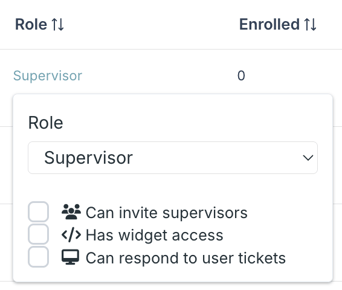
Once the user is a supervisor, you will want to go to Settings > Teams, then click into the team you want them to be a supervisor of. Once in the specific team's page, there will be a list of users on the right-hand side. Search for the user in that list, then drag and drop them over to the supervisor section.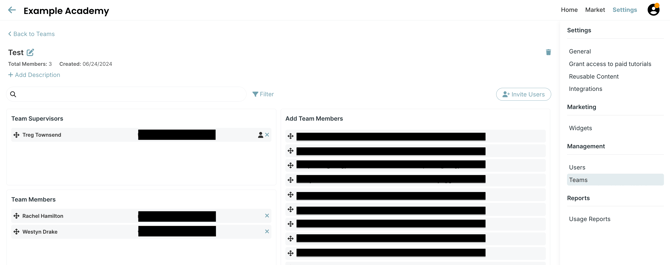 After that, you can go back to your homepage, and it will auto-save. Then your user should be a team supervisor.